
The following is a list of keyboard shortcuts that are available in Microsoft Word 2002, in Microsoft Office Word 2003, and in Microsoft Office Word 2007. This list is a compilation of the individual keyboard shortcut lists available in Word 2002 Help and in Word 2003 Help.
Note Shortcut keys mentioned in the Help topics, menus, and dialog boxes refer to the U.S. keyboard layout. Keys on other layouts may not correspond exactly to the keys on a U.S. keyboard. If you are using a different language keyboard layout from the version of Word you are using, you may have to make adjustments when using shortcut keys.
[caption id="" align="aligncenter" width="550" caption="microsoft word keyboard shortcuts"]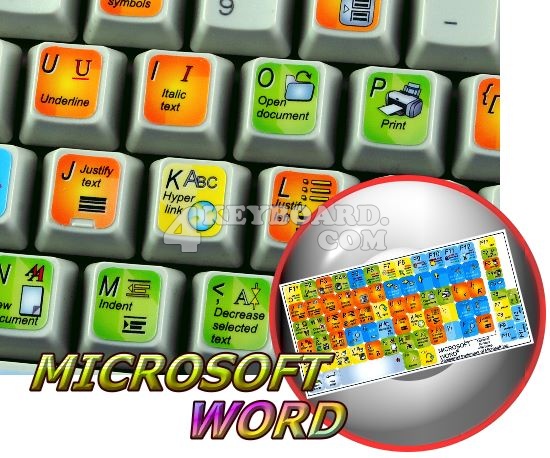
Keyboard Shortcut | Result in Microsoft Word |
| CTRL and A | Selects all in the current document. |
| CTRL and B | Bold text. |
| CTRL and C | Copies the item or text to the Clipboard and can be pasted using CTRL and V. |
| CTRL and D | Displays the Font dialogue box. |
| CTRL and E | Centre Alignment. |
| CTRL and F | Displays the Find dialog box, to search the current document. |
| CTRL and G | Displays the Go to dialog box, to go to a specific location in the current document. |
| CTRL and H | Displays the Replace dialogue box. |
| CTRL and I | Italic text. |
| CTRL and J | Full Justification. |
| CTRL and K | Create Hyperlink |
| CTRL and L | Left Alignment |
| CTRL and M | Tab |
| CTRL and N | Creates a new document. |
| CTRL and O | Displays the Open File dialogue box. |
| CTRL and P | Displays the Print dialog box. |
| CTRL and R | Right Alignment. |
| CTRL and S | Displays the Save dialog box. |
| CTRL and U | Underline text |
| CTRL and V | Pastes the copied item or text from the Clipboard into the current position in the document. |
| CTRL and X | Cuts the item or text selected to the Clipboard. |
| CTRL and Y | Redo the last undone action. |
| CTRL and Z | Undoes the last action. |
| CTRL and ENTER | Insert Page Break. |
| CTRL and F2 | Show Print preview. |
| CTRL and F4 | Closes the active document window. |
| CTRL and F6 | Opens the next document window. |
| F1 key | Get help or use the Office assistant. |
| SHIFT and F1 Key | Context sensitive help. |
| F2 Key | Move text or image. |
| SHIFT and F2 Key | Copy Text. |
| F3 Key | Insert an autotext entry. |
| SHIFT and F3 Key | Change the case of the selected text. |
| F4 Key | Perform last action again. |
| SHIFT and F4 Key | Perform a Find or Go to action again. |
| F5 Key | Displays the Go to dialogue box, from here you can also Find and Replace. |
| SHIFT and F5 Key | Move to a previous revision. |
| F6 Key | Go to the next frame or pane. |
| SHIFT and F6 Key | Go to the previous frame or pane. |
| F7 Key | Launch the Spell checker. |
| SHIFT and F7 Key | Launch the Thesaurus. |
| F8 Key | Extend the current selection. |
| SHIFT and F8 Key | Shrink the current selection. |
| F9 Key | Update the selected fields. |
| SHIFT and F9 Key | Switch between a field code and its result. |
| F10 Key | Activate the menu bar. |
| SHIFT and F10 Key | Display a Shortcut Menu. Same as right clicking. |
| F11 Key | Go to the next field. |
| SHIFT and F11 Key | Go to the previous field. |
| F12 Key | Save file As, equivalent to tools menu. |
| SHIFT and F12 Key | Save document, equivalent to tools menu. |
Some more from microsoft All Caps CTRL+SHIFT+A
Annotation ALT+CTRL+M
App Maximize ALT+F10
App Restore ALT+F5
Apply Heading1 ALT+CTRL+1
Apply Heading2 ALT+CTRL+2
Apply Heading3 ALT+CTRL+3
Apply List Bullet CTRL+SHIFT+L
Auto Format ALT+CTRL+K
Auto Text F3 or ALT+CTRL+V
Bold CTRL+B or CTRL+SHIFT+B
Bookmark CTRL+SHIFT+F5
Browse Next CTRL+PAGE DOWN
Browse Previous CTRL+PAGE UP
Browse Sel ALT+CTRL+HOME
Cancel ESC
Center Para CTRL+E
Change Case SHIFT+F3
Char Left LEFT
Char Left Extend SHIFT+LEFT
Char Right RIGHT
Char Right Extend SHIFT+RIGHT
Clear DELETE
Close or Exit ALT+F4
Close Pane ALT+SHIFT+C
Column Break CTRL+SHIFT+ENTER
Column Select CTRL+SHIFT+F8
Copy CTRL+C or CTRL+INSERT
Copy Format CTRL+SHIFT+C
Copy Text SHIFT+F2
Create Auto Text ALT+F3
Customize Add Menu ALT+CTRL+=
Customize Keyboard ALT+CTRL+NUM +
Customize Remove Menu ALT+CTRL+-
Cut CTRL+X or SHIFT+DELETE
Date Field ALT+SHIFT+D
Delete Back Word CTRL+BACKSPACE
Delete Word CTRL+DELETE
Dictionary ALT+SHIFT+F7
Do Field Click ALT+SHIFT+F9
Doc Close CTRL+W or CTRL+F4
Doc Maximize CTRL+F10
Doc Move CTRL+F7
Doc Restore CTRL+F5
Doc Size CTRL+F8
Doc Split ALT+CTRL+S
Double Underline CTRL+SHIFT+D
End of Column ALT+PAGE DOWN
End of Column ALT+SHIFT+PAGE DOWN
End of Doc Extend CTRL+SHIFT+END
End of Document CTRL+END
End of Line END
End of Line Extend SHIFT+END
End of Row ALT+END
End of Row ALT+SHIFT+END
End of Window ALT+CTRL+PAGE DOWN
End of Window Extend ALT+CTRL+SHIFT+PAGE DOWN
Endnote Now ALT+CTRL+D
Extend Selection F8
Field Chars CTRL+F9
Field Codes ALT+F9
Find CTRL+F
Font CTRL+D or CTRL+SHIFT+F
Font Size Select CTRL+SHIFT+P
Footnote Now ALT+CTRL+F
Go Back SHIFT+F5 or ALT+CTRL+Z
Go To CTRL+G or F5
Grow Font CTRL+SHIFT+.
Grow Font One Point CTRL+]
Hanging Indent CTRL+T
Header Footer Link ALT+SHIFT+R
Help F1
Hidden CTRL+SHIFT+H
Hyperlink CTRL+K
Indent CTRL+M
Italic CTRL+I or CTRL+SHIFT+I
Justify Para CTRL+J
Left Para CTRL+L
Line Down DOWN
Line Down Extend SHIFT+DOWN
Line Up UP
Line Up Extend SHIFT+UP
List Num Field ALT+CTRL+L
Lock Fields CTRL+3 or CTRL+F11
Macro ALT+F8
Mail Merge Check ALT+SHIFT+K
Mail Merge Edit Data Source ALT+SHIFT+E
Mail Merge to Doc ALT+SHIFT+N
Mail Merge to Printer ALT+SHIFT+M
Mark Citation ALT+SHIFT+I
Mark Index Entry ALT+SHIFT+X
Mark Table of Contents Entry ALT+SHIFT+O
Menu Mode F10
Merge Field ALT+SHIFT+F
Microsoft Script Editor ALT+SHIFT+F11
Microsoft System Info ALT+CTRL+F1
Move Text F2
New CTRL+N
Next Cell TAB
Next Field F11 or ALT+F1
Next Misspelling ALT+F7
Next Object ALT+DOWN
Next Window CTRL+F6 or ALT+F6
Normal ALT+CTRL+N
Normal Style CTRL+SHIFT+N or ALT+SHIFT+CLEAR (NUM 5)
Open CTRL+O or CTRL+F12 or ALT+CTRL+F2
Open or Close Up Para CTRL+0
Other Pane F6 or SHIFT+F6
Outline ALT+CTRL+O
Outline Collapse ALT+SHIFT+- or ALT+SHIFT+NUM -
Outline Demote ALT+SHIFT+RIGHT
Outline Expand ALT+SHIFT+=
Outline Expand ALT+SHIFT+NUM +
Outline Move Down ALT+SHIFT+DOWN
Outline Move Up ALT+SHIFT+UP
Outline Promote ALT+SHIFT+LEFT
Outline Show First Line ALT+SHIFT+L
Overtype INSERT
Page ALT+CTRL+P
Page Break CTRL+ENTER
Page Down PAGE DOWN
Page Down Extend SHIFT+PAGE DOWN
Page Field ALT+SHIFT+P
Page Up PAGE UP
Page Up Extend SHIFT+PAGE UP
Para Down CTRL+DOWN
Para Down Extend CTRL+SHIFT+DOWN
Para Up CTRL+UP
Para Up Extend CTRL+SHIFT+UP
Paste CTRL+V or SHIFT+INSERT
Paste Format CTRL+SHIFT+V
Prev Cell SHIFT+TAB
Prev Field SHIFT+F11 or ALT+SHIFT+F1
Prev Object ALT+UP
Prev Window CTRL+SHIFT+F6 or ALT+SHIFT+F6
Print CTRL+P or CTRL+SHIFT+F12
Print Preview CTRL+F2 or ALT+CTRL+I
Proofing F7
Redo ALT+SHIFT+BACKSPACE
Redo or Repeat CTRL+Y or F4 or ALT+ENTER
Repeat Find SHIFT+F4 or ALT+CTRL+Y
Replace CTRL+H
Reset Char CTRL+SPACE or CTRL+SHIFT+Z
Reset Para CTRL+Q
Revision Marks Toggle CTRL+SHIFT+E
Right Para CTRL+R
Save CTRL+S or SHIFT+F12 or ALT+SHIFT+F2
Save As F12
Select All CTRL+A or CTRL+CLEAR (NUM 5) or CTRL+NUM 5
Select Table ALT+CLEAR (NUM 5)
Show All CTRL+SHIFT+8
Show All Headings ALT+SHIFT+A
Show Heading1 ALT+SHIFT+1
Show Heading2 ALT+SHIFT+2
Show Heading3 ALT+SHIFT+3
Show Heading4 ALT+SHIFT+4
Show Heading5 ALT+SHIFT+5
Show Heading6 ALT+SHIFT+6
Show Heading7 ALT+SHIFT+7
Show Heading8 ALT+SHIFT+8
Show Heading9 ALT+SHIFT+9
Shrink Font CTRL+SHIFT+,
Shrink Font One Point CTRL+[
Small Caps CTRL+SHIFT+K
Space Para1 CTRL+1
Space Para15 CTRL+5
Space Para2 CTRL+2
Spike CTRL+SHIFT+F3 or CTRL+F3
Start of Column ALT+PAGE UP
Start of Column ALT+SHIFT+PAGE UP
Start of Doc Extend CTRL+SHIFT+HOME
Start of Document CTRL+HOME
Start of Line HOME
Start of Line Extend SHIFT+HOME
Start of Row ALT+HOME
Start of Row ALT+SHIFT+HOME
Start of Window ALT+CTRL+PAGE UP
Start of Window Extend ALT+CTRL+SHIFT+PAGE UP
Style CTRL+SHIFT+S
Subscript CTRL+=
Superscript CTRL+SHIFT+=
Symbol Font CTRL+SHIFT+Q
Thesaurus SHIFT+F7
Time Field ALT+SHIFT+T
Toggle Field Display SHIFT+F9
Toggle Master Subdocs CTRL+\
Tool SHIFT+F1
Un Hang CTRL+SHIFT+T
Un Indent CTRL+SHIFT+M
Underline CTRL+U or CTRL+SHIFT+U
Undo CTRL+Z or ALT+BACKSPACE
Unlink Fields CTRL+6 or CTRL+SHIFT+F9
Unlock Fields CTRL+4 or CTRL+SHIFT+F11
Update Auto Format ALT+CTRL+U
Update Fields F9 or ALT+SHIFT+U
Update Source CTRL+SHIFT+F7
VBCode ALT+F11
Web Go Back ALT+LEFT
Web Go Forward ALT+RIGHT
Word Left CTRL+LEFT
Word Left Extend CTRL+SHIFT+LEFT
Word Right CTRL+RIGHT
Word Right Extend CTRL+SHIFT+RIGHT
Word Underline CTRL+SHIFT+W


0 comments:
Post a Comment